
Energy monitoring system
VPVision makes energy savings easy, fast, and cost-effective. Using the latest web technologies, it allows you to view your data anywhere, anytime. VPVision analyzes flow data and highlights your savings potential. VPVision lets you view the actual costs of all your utilities, including compressed air, process gases, steam, vacuum, natural gas, electricity, wastewater, heating fuels, and more.
VPVision is extremely flexible and adaptable; it’s suitable for small and large businesses alike, as well as rapidly growing companies. You can customize the VPVision monitoring system yourself: add channels, modify dashboards, and create your own reports.
VPVision will help your organization raise energy awareness among your staff. It will guide you in identifying energy savings at the individual, team, or company-wide levels.
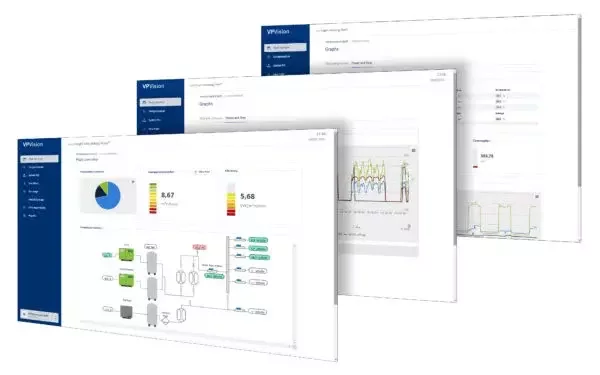
Features of the VPVision monitoring system
- Complete energy monitoring system for all your equipment
• Secure on-site data storage on the robust industrial device
VPVision Edge
• Comprehensive web-based energy management software, with customizable screens
• Accessible via Ethernet and/or 3G/4G thanks to built-in VPN router
• View your measurement data in intuitive dashboards, including Key Performance Indicators (KPIs), tables, graphs, consumption previews, P&ID diagrams, and much more
• Automated PDF reports with email sending function and alert messages: no need to consult the system itself
• Friendly interface
• Flexible and scalable: start modestly and expand your installation over time, with no limit to the number of sensors
• Supports your ISO 50001 energy management system
Included in all VPVision sets
- Preconfiguration of your VPVision
• Commissioning training for end users and 4 hours of advice per year
• Warranty remains valid as long as your license is active
• Configuration of sensors and instruments (provided by VPInstruments) and their connection to VPVision
• Creating standard widgets and pages for smooth commissioning
• Setting up the connection to the cloud
• Documentation of the configuration provided